Vertex AI Pricing Explained: The Complete Guide to Gemini Enterprise Agent Platform Costs
Navigating Google Cloud AI Costs
As generative AI and agentic systems move from experimental proofs-of-concept to core operational infrastructure, managing AI spend has become a top priority for IT leaders, FinOps teams, and developers.
When searching for Vertex AI pricing, many organizations encounter immediate confusion. Google Cloud recently evolved Vertex AI into the Gemini Enterprise Agent Platform, uniting model garden selection, custom machine learning capabilities, and multi-agent orchestration under a single, unified enterprise ecosystem.
While the name and feature set have expanded, the underlying billing principles remain flexible and modular. Whether you are invoking Gemini models via API, running custom-trained ML workloads, indexing enterprise knowledge for search, or deploying autonomous multi-agent systems, understanding how billing works is key to controlling costs.
In this guide, we will demystify Vertex AI / Agent Platform pricing, break down the core billing components, explore different consumption models, and share actionable strategies to optimize your AI bill—with help from Cloudasta.
1. The Name Evolution: Vertex AI to Gemini Enterprise Agent Platform
Before diving into numbers, it's essential to clear up the branding landscape:
What was Vertex AI? Vertex AI was Google Cloud’s flagship machine learning platform for training custom models, hosting endpoints, and accessing Google foundation models.
What is Gemini Enterprise Agent Platform? It is the evolution of Vertex AI. All Vertex AI services, APIs, SDKs, and infrastructure (along with new capabilities like Agent Studio, Agent Runtime, Memory Bank, and Agent Gateway) are now delivered under the Gemini Enterprise Agent Platform umbrella.
If you are existing Vertex AI user or integrating via the Vertex AI SDK, your existing workflows and API endpoints continue to function, but your billing items will reflect the unified platform's pricing structure.
2. The Four Pillars of AI Billing on Google Cloud
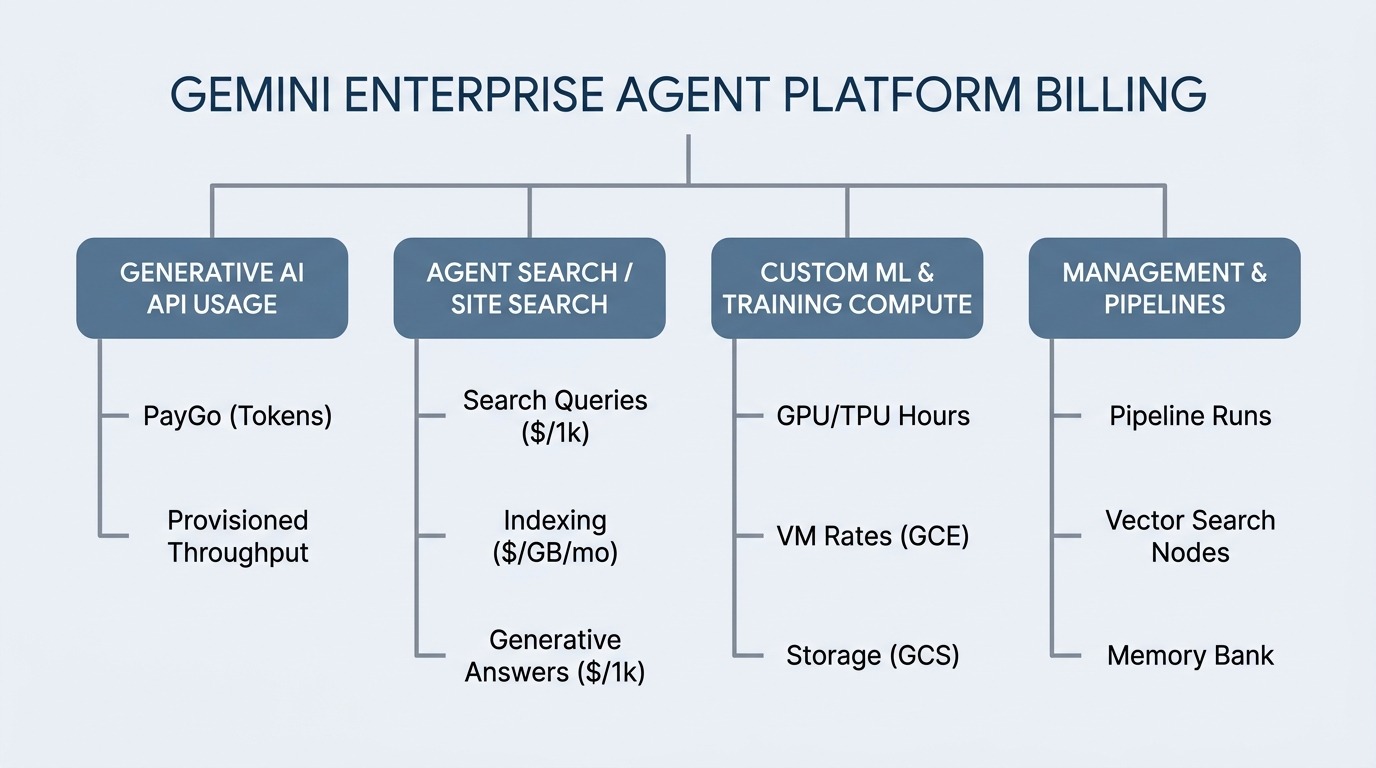
Pricing across the platform is split into four primary categories based on the service tier and resource types you consume:
3. Generative AI Model Pricing (Gemini, Imagen, & Third-Party Models)
For generative AI applications, charges are primarily calculated based on tokens or characters processed.
A. Token-Based Pay-as-You-Go (PayGo)
When using foundation models in Model Garden (such as Gemini 2.5 Flash, Gemini 3 Pro, or Imagen), you pay per request based on input (prompt) and output (response) volumes:
Text, Chat, and Code Generation: Billed per 1,000 characters or per million tokens for input and output.
Multimodal Inputs: Image, audio, and video inputs are converted into token equivalents or billed based on file duration/count.
Image & Video Generation (Imagen / Veo): Billed per image or video generated (starting at ~$0.0001 per image depending on resolution and customization).
Third-Party & Open Models: Partner models (such as Anthropic Claude Opus/Sonnet or Mistral) and Model-as-a-Service (MaaS) open models (like Gemma or Llama) are billed based on their respective model-specific token rates.
B. PayGo Pricing Tiers
Google offers three PayGo tiers for flexibility:
Standard PayGo: Default pay-as-you-go pricing for standard request limits.
Priority PayGo: Premium pricing ensuring higher QPS (queries per second) and lower latency during peak demand.
Flex PayGo: Discounted pricing for non-urgent batch jobs that can tolerate variable processing times.
C. Provisioned Throughput (Committed Capacity)
For high-volume production applications with predictable traffic, Provisioned Throughput allows you to purchase dedicated model capacity.
Instead of paying per character/token, you commit to a fixed amount of throughput.
Ensures guaranteed concurrency, predictable latency, and significant cost savings at scale compared to standard PayGo rates.
4. Agent Search and Site Search Pricing
When grounding models in enterprise data or powering customer-facing website search (formerly Vertex AI Search / Generative AI App Builder), pricing is based on queries, indexing, and generative enrichments:
Feature / Usage
Description
Standard Rate
Search Queries
Standard user search requests across basic and advanced site search
$4.00 per 1,000 queries
Site Indexing
Storage and indexing for advanced search and custom metadata
Starting at $5.00 / GB / month (~2,000 pages)
Generative Answers
Add-on service generating AI-summarized answers grounded in your data
$4.00 per 1,000 queries
Example: A website handling 500,000 simple search queries and 500,000 queries requiring generative AI answers, with 10 GB of indexed content, would incur approximately:
If you build custom ML models, train models from scratch, or perform hyperparameter tuning, pricing maps directly to underlying Google Cloud infrastructure:
Custom Training Compute: Billed based on the hourly rates of the Compute Engine virtual machines, GPUs (e.g., NVIDIA H100, RTX PRO 6000, T4), or TPUs (e.g., Trillium, TPU v5e/v5p) used during training.
Notebooks (Colab Enterprise & Workbench): Billed at standard Compute Engine VM and Cloud Storage rates, plus nominal management fees based on runtime duration.
Agent Platform Pipelines: Billed at a flat fee starting at $0.03 per pipeline run, plus the underlying compute resources consumed during execution.
Vector Search: Billed based on index size, queries per second (QPS), and the number of serving nodes deployed.
6. Actionable Strategies to Optimize Vertex AI / Agent Platform Costs
AI infrastructure can easily become a major expense if left unmanaged. Here are five practical strategies to keep your AI costs lean:
Strategy 1: Smart Model Routing (Flash vs. Pro)
Not every task requires a massive frontier model like Gemini 3 Pro.
Use lightweight, high-speed models like Gemini Flash or Flash-Lite for classification, extraction, simple summarization, and routing.
Route complex reasoning, multi-step planning, or deep creative tasks to Gemini Pro or specialized partner models.
Strategy 2: Leverage Context Caching
If your prompts frequently include large static context—such as 100-page PDF manuals, codebase repositories, or system guidelines—use Prompt Context Caching.
Context caching allows you to store pre-processed prompt tokens in memory.
Reduces input token charges for repeated context by up to 90% and dramatically improves response latency.
Strategy 3: Use Batch Prediction for Asynchronous Jobs
For non-real-time tasks (like overnight document processing, catalog tagging, or offline sentiment analysis), use Batch Inference or Flex PayGo. Running batch jobs avoids peak pricing and leverages discounted compute rates.
Strategy 4: Optimize Vector Search & Index Sizing
When building RAG (Retrieval-Augmented Generation) applications:
Filter and chunk data prior to embedding generation so you only index relevant text.
Right-size your Vector Search serving nodes and implement autoscaling to avoid paying for idle capacity during off-peak hours.
Strategy 5: Set Up Budget Alerts & Quotas
Enforce strict rate limits and quota caps in your GCP Console to prevent runaway loops or unexpected spikes in public-facing search or agent endpoints.
7. How Cloudasta Helps You Master Your AI Spend
Implementing AI governance and FinOps isn't just about cutting costs—it's about ensuring every dollar spent delivers measurable business value.
As a certified Google Cloud partner, Cloudasta helps organizations design, scale, and optimize their AI workloads on the Gemini Enterprise Agent Platform.
What Cloudasta Offers:
AI Cost & Architecture Audits: We review your prompt patterns, model selection, RAG setups, and endpoint configurations to eliminate waste.
FinOps & Commitment Strategy: We help you evaluate PayGo vs. Provisioned Throughput so you lock in the deepest discounts without over-committing.
Agent Governance & Safety: We assist in setting up Agent Gateway, Model Armor, and identity guardrails to ensure your deployed agents operate securely.
Hands-on Developer Support: Our team works directly with your engineers to implement context caching, model routing, and efficient vector search pipelines.
Conclusion
Understanding Vertex AI pricing, now part of the Gemini Enterprise Agent Platform, does not have to be overwhelming. By leveraging pay-as-you-go flexibility, choosing the right model for each task, and optimizing prompt structures, you can build powerful AI systems while keeping your GCP bill completely under control.
Ready to optimize your Google Cloud AI spend? Contact Cloudasta today to schedule a tailored AI architecture and cost review with our cloud experts!
Cloudasta, Google Workspace Productivity & Migration Experts
Your one-stop partner for seamless migrations, expert advisory, support, and training.