The Developer’s Guide to Gemini API: Pricing, Quotas, and Integration
As generative AI transitions from proof-of-concept projects to mission-critical enterprise workloads, managing token economics and infrastructure overhead becomes a core architectural requirement. Choosing the right AI model isn't just a benchmark evaluation, it is a financial and operational decision.
Google’s Gemini API offers one of the most competitive price-to-performance profiles in the market, spanning high-speed models like Gemini Flash-Lite to flagship reasoning models like Gemini 3.1 Pro. However, understanding how Gemini API pricing scales across Google AI Studio, Vertex AI, context caching, batch requests, and quota tiers can be complex.
Whether you are a developer looking to optimize monthly API spend or an enterprise engineering team planning a large-scale AI modernization, this guide breaks down the pricing structure, quota mechanics, context caching savings, and key architectural strategies for cost optimization.
Quick Takeaways
Primary Pricing Model: Gemini API pricing is metered per 1 million (1M) tokens, with separate billing rates for input tokens and output (response/reasoning) tokens.
Tier Options:
Free Tier (Google AI Studio): Ideal for prototyping; rate-limited, with data used for model quality improvements.
Pay-As-You-Go (Google AI Studio / GCP): Enterprise data privacy, higher throughput quotas, and commercial deployment rights.
Vertex AI / Gemini Enterprise Agent Platform: Full enterprise IAM, private networking (VPC-SC), unified Google Cloud billing, and custom quota allocations.
Major Cost Drivers & Levers:
Context Caching: Reduces input costs by up to 90\% on repeated long context windows.
Batch API: Cuts input and output token rates by 50\% for non-realtime, asynchronous processing.
Grounding Fees: Additional fixed fees per 1,000 queries apply when enabling Google Search or Google Maps grounding.
Enterprise Modernization Partner: Optimizing token spend, setting up robust FinOps controls, and migrating from AI Studio API keys to enterprise-grade GCP infrastructure often requires specialized architecture. A certified Google Cloud Partner like Cloudasta helps organizations streamline AI modernization while controlling cloud spend.
Understanding Gemini API Tiering: Google AI Studio vs. Vertex AI
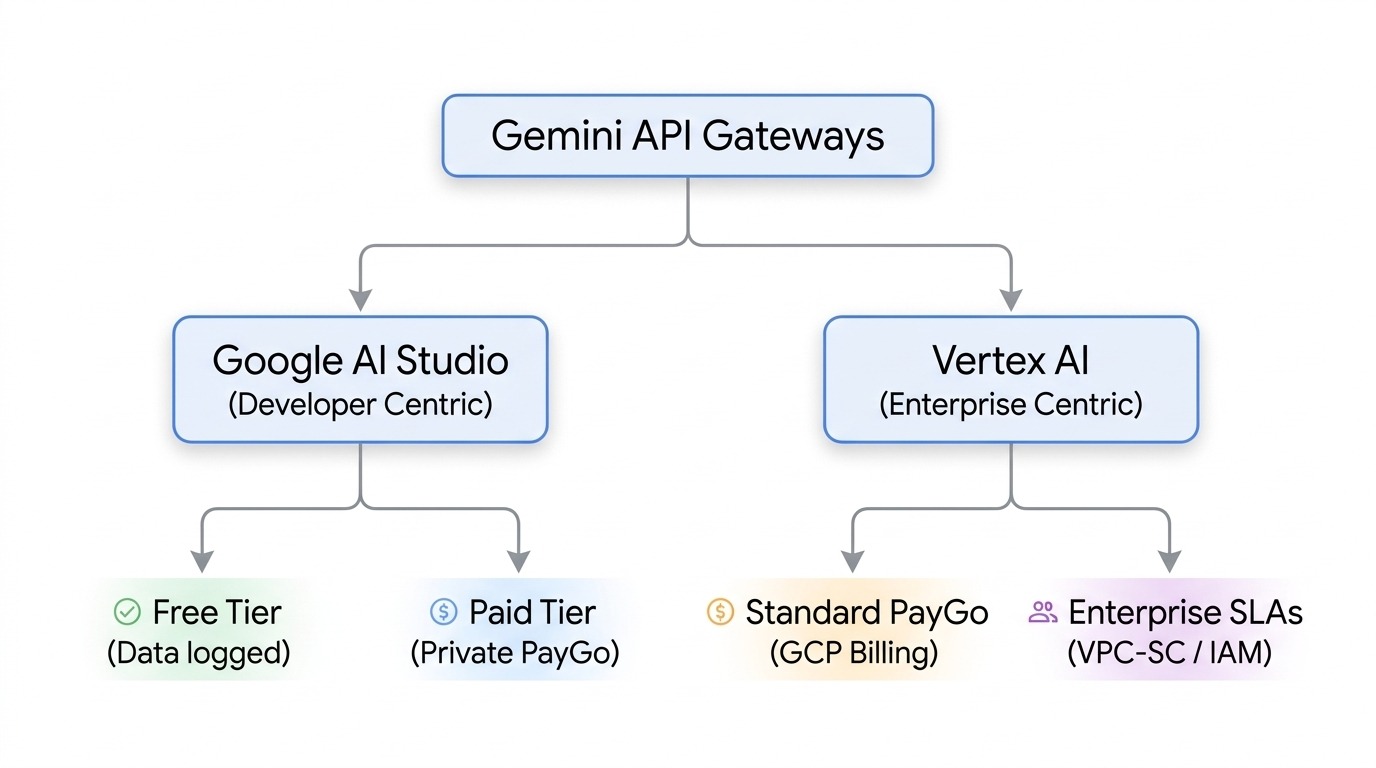
Before evaluating token rates, developers must select the appropriate environment for their Gemini API access. Google provides two main gateways, each serving distinct lifecycle stages:
1. Google AI Studio (Free Tier)
Best for: Developers, hackathons, and initial experimentation.
Characteristics: Offers free access to select Gemini models with lower rate limits (Requests Per Minute/Day). Important Note: Data processed under the free tier may be logged and reviewed by Google to improve product services.
2. Google AI Studio (Paid Tier / Standard PayGo)
Best for: Early-stage production applications and independent software developers.
Characteristics: Pay-as-you-go billing tied to a Google Cloud Billing account. Input/output data remains strictly private and is never used to train Google models. Access to higher quotas and SLA support.
3. Vertex AI / Gemini Enterprise Agent Platform
Best for: Corporate workloads, production AI agents, and compliance-heavy environments.
Characteristics: Integrates natively into your Google Cloud project infrastructure. Features granular IAM controls, customer-managed encryption keys (CMEK), private endpoints via VPC Service Controls, unified enterprise billing, and direct coupling with GCP data engines (BigQuery, Vector Search, Agent Garden).
Comprehensive Gemini API Pricing Breakdown
Google structures Gemini API rates around three primary model families: Pro (frontier reasoning), Flash (balanced price-performance), and Flash-Lite (high-throughput, low-latency tasks).
Rates below represent standard Global Pay-As-You-Go rates per 1M tokens:
Model Tier
API Model
Input Price (per 1M)
Cached Input (per 1M)
Output Price (per 1M)
Batch Input (per 1M)
Batch Output (per 1M)
Max Context
Frontier Reasoning
Gemini 3.1 Pro (Prompt < 200K)
$2.00
$0.20
$12.00
$1.00
$6.00
1M
Gemini 3.1 Pro (Prompt > 200K)
$4.00
$0.40
$18.00
$2.00
$9.00
1M
Workhorse / General
Gemini 3.6 / 3.7 Flash
$1.50
$1.15
$7.50
$0.75
$3.75
1M
Gemini 3.5 Flash
$1.50
$1.15
$9.00
$0.75
$4.50
1M
High Volume / Lite
Gemini 3.5 Flash-Lite
$0.30
$0.03
$2.50
$1.15
$1.25
1M
Gemini 2.5 Flash-Lite
$0.10
$0.01
$0.40
$0.05
$0.20
1M
Note: Promotional or regional discounts may apply depending on GCP billing agreements and active preview periods.
Key Pricing Variables to Keep in Mind:
Long Context Surcharge (Pro Tier): For prompts exceeding 200K input tokens on Pro models, the base input and output rates increase to account for extended memory overhead.
Context Caching Storage: Cached input tokens reduce processing cost to 10% of standard input rates (a 90% savings). However, stored context caches incur a storage cost per 1M tokens per hour: 1.00onmostFlashmodels(0.50 on Gemini 3.6 to 3.8 Flash through December 31, 2026) and $4.50 on Gemini 3.1 Pro).
Grounding Services:
Grounding with Google Search: Includes 5,000 free requests per month, then billed at approximately $14.00 per 1,000 search queries.
Grounding with Google Maps: Includes 5,000 free requests per month, then $14.00 per 1,000 queries. Both free allowances are shared across all Gemini 3 models.
Navigating Gemini API Quotas and Rate Limits
System performance is governed by API quotas designed to maintain cluster stability and balance system resources across tenants. Understanding these metrics prevents runtime failures such as HTTP 429 (Too Many Requests) errors.
The 3 Core Quota Dimensions
RPM (Requests Per Minute): Governs how frequently your application can trigger API requests. Limits vary by model and usage tier (Free, Tier 1, Tier 2, Tier 3), and you can view your current limits in AI Studio. You move up tiers based on cumulative spend: $100+ for Tier 2 and $1,000+ for Tier 3.
TPM (Tokens Per Minute): Measures input token throughput per minute. If you send large PDF documents or long prompt histories, you may breach TPM limits before reaching your RPM cap.
RPD (Requests Per Day): Imposes a hard daily maximum. The daily count resets at midnight Pacific Time.
Managing HTTP 429 Errors & Scaling Quotas
Exponential Backoff: Implement exponential backoff algorithms with jitter in SDK client calls to gracefully retry transient rate-limit spikes.
Quota Increases via GCP Console: Unlike Google AI Studio (which has semi-fixed tier buckets), Gemini models on Vertex AI (now Gemini Enterprise Agent Platform) use Dynamic Shared Quota, so there are no quota increase requests to file. For guaranteed capacity, enterprises purchase Provisioned Throughput. On Google AI Studio, higher limits come from moving up usage tiers or submitting Google's rate limit increase form.
Architectural Best Practices for Optimizing Gemini API Costs (FinOps)
To maintain budget control while scaling generative AI, engineering teams should incorporate these architectural strategies into their development pipeline:
1. Implement Dynamic Model Routing
Do not send every prompt to your most powerful model. Establish a multi-tier routing architecture:
Use Gemini 2.5 Flash-Lite ($0.10 / 1M input) for Intent Classification, JSON Formatting, and Keyword Extraction.
Route standard operational workflows to Gemini 3.6 Flash ($1.50 / 1M input).
Reserve Gemini 3.1 Pro ($2.00 / 1M input) exclusively for complex multi-step reasoning, coding tasks, or deep data synthesis.
2. Leverage Context Caching for System Prompts & Knowledge Bases
If your application passes a large system prompt, set of regulatory guidelines, or technical manual (e.g., >32K tokens) with every query:
Store the context block using the Context Caching API.
Pay the reduced cached input rate ($0.15 / 1M vs $1.50 / 1M), reducing your input token costs by up to 90%.
3. Offload Non-Realtime Tasks to the Batch API
For background workloads—such as batch translation, bulk document summarization, or offline dataset enrichment:
Use the Gemini Batch API.
Operations process asynchronously within a 24-hour window at a flat 50% discount on both input and output token costs.
4. Enable FinOps Monitoring & Token Budgets
Set up Google Cloud Budgets & Alerts connected to Pub/Sub or email notifications. Monitor project-level spend by setting custom enterprise labels per application component or microservice.
The AI Modernization Challenge: Why Partner with an Expert?
While testing the Gemini API with an API key is simple, taking an AI application to production involves complex operational and financial challenges:
Cost Spikes & Financial Governance: Uncontrolled loops or unoptimized long-context prompts can lead to unexpected cloud bill inflation without proper monitoring.
Security & Compliance Controls: Securing API endpoints, isolating sensitive customer data, and ensuring HIPAA/SOC2 compliance on Vertex AI requires robust GCP IAM and network architecture.
Enterprise Infrastructure Transition: Shifting from prototype API keys in AI Studio to production-ready enterprise environments (Vertex AI pipelines, Agent Runtime, CI/CD) demands expert cloud engineering.
Scale Your Enterprise AI Strategy with Cloudasta
Modernizing your infrastructure with Google Cloud AI doesn't have to be overwhelming or cost-prohibitive. Cloudasta, a premier Google Cloud Partner, specializes in helping organizations design, optimize, and deploy high-performance AI architectures on GCP.
Optimize Gemini API Spend: Perform deep FinOps evaluations to model token usage, configure context caching, and lower API expenditures.
Enterprise Vertex AI Deployment: Transition seamlessly from prototyping in AI Studio to production architectures on Vertex AI with enterprise-grade security, logging, and IAM controls.
Build Autonomous AI Workflows: Leverage pre-built agent frameworks (Agent Garden, ADK) and custom tool-calling integrations tailored to your business needs.
Quota & SLA Architecture: Secure dedicated resource allocations and high-throughput quotas to guarantee uptime for enterprise applications.
Ready to optimize your Gemini API architecture and build scalable AI workloads on GCP?
👉Contact Cloudasta Today to schedule a custom AI strategy and cost-optimization consultation with our Google Cloud experts.
Cloudasta, Google Workspace Productivity & Migration Experts
Your one-stop partner for seamless migrations, expert advisory, support, and training.