


For modern enterprise infrastructure teams, Google Cloud Storage (GCS) is often a double-edged sword. While it provides virtually limitless scalability, high durability, and seamless integration across Google Cloud Platform (GCP), it is also one of the most common sources of unmanaged cloud spend.
Without proactive financial engineering and structural guardrails, organizations quickly suffer from bucket sprawl: unlabelled, multi-regional Standard buckets filled with stale log files, unversioned temporary builds, and forgotten analytical datasets. Over time, storage spend compounds silently—not just from raw byte capacity, but from expensive multi-region replication and sub-optimal storage tiering.
This playbook provides FinOps Specialists, IT Directors, and Cloud Infrastructure Managers with an operational, step-by-step blueprint. By combining Object Lifecycle Management (OLM), GCS Autoclass, Storage Insights, Organizational Constraints, and Cloud Billing Telemetry, you can transform GCS from a passive cost center into a self-optimizing storage engine.
Before automating lifecycle transitions for existing data, you must establish organizational guardrails to control how new storage buckets are provisioned.
Multi-Region storage offers high availability across geographic zones, but it costs significantly more than Single-Region storage. Developers frequently select Multi-Region by default for workloads that only require single-region availability (e.g., localized staging environments or regional data processing pipelines).
Use GCP Resource Location Constraints within your Organization Policy to restrict where buckets can be created:
# Organization Policy Constraint: Restrict Resource Locations
name: organizations/123456789012/policies/gcp.resourceLocations
spec:
  rules:
    - allow:
        values:
          - in:us-central1-locations
          - in:europe-west1-locations
Enforce bucket creation parameters using Terraform modules. Deny the creation of MULTI_REGIONAL buckets unless an explicit architectural override flag is approved.
Terraform
# Terraform Guardrail Example for GCS Buckets
resource "google_storage_bucket" "governed_bucket" {
  name = var.bucket_name
  location = var.preferred_region # e.g., "us-central1"
  storage_class = "STANDARD"
  public_access_prevention = "enforced"
  uniform_bucket_level_access = true

  labels = merge(var.required_labels, {
    managed_by  = "terraform"
    cost_center = var.cost_center_id
  })
}
IAM governance requires standardizing access controls. Enforce Uniform Bucket-Level Access enterprise-wide using the Organization Policy constraint storage.uniformBucketLevelAccess. This disables legacy Per-Object Access Control Lists (ACLs), ensuring centralized IAM policy evaluation and preventing unauthorized, unmonitored data retention.
You cannot optimize what you cannot measure. As data footprints grow into petabytes, running API operations (gcloud storage ls or gsutil ls) to analyze object age and metadata becomes cost-prohibitive and slow.
GCP Storage Insights provides automated daily inventory reports, generating CSV or Parquet files directly into a designated metrics bucket. This allows infrastructure teams to audit data distributions without incurring massive operational read API costs (Class A requests).
To enable precise cost allocation in Cloud Billing, every bucket must adhere to a standardized schema.
To isolate storage costs by department, export Cloud Billing data to BigQuery and execute cost breakdown queries:
SQL
SELECT
  project.id AS project_id,
  labels.value AS cost_center,
  SUM(cost) AS total_storage_cost,
  SUM(currency_conversion_rate * cost) AS net_cost
FROM
  `your_project.billing_export.gcp_billing_export_v1_XXXXXX`,
  UNNEST(labels) AS labels
WHERE
  service.description = "Cloud Storage"
  AND labels.key = "cost-center"
GROUP BY
  project_id, cost_center
ORDER BY
  net_cost DESC;
Google Cloud Storage offers two primary mechanisms for automated tiering: Object Lifecycle Management (OLM) and Autoclass. Selecting the right mechanism depends on access predictability and object sizes.
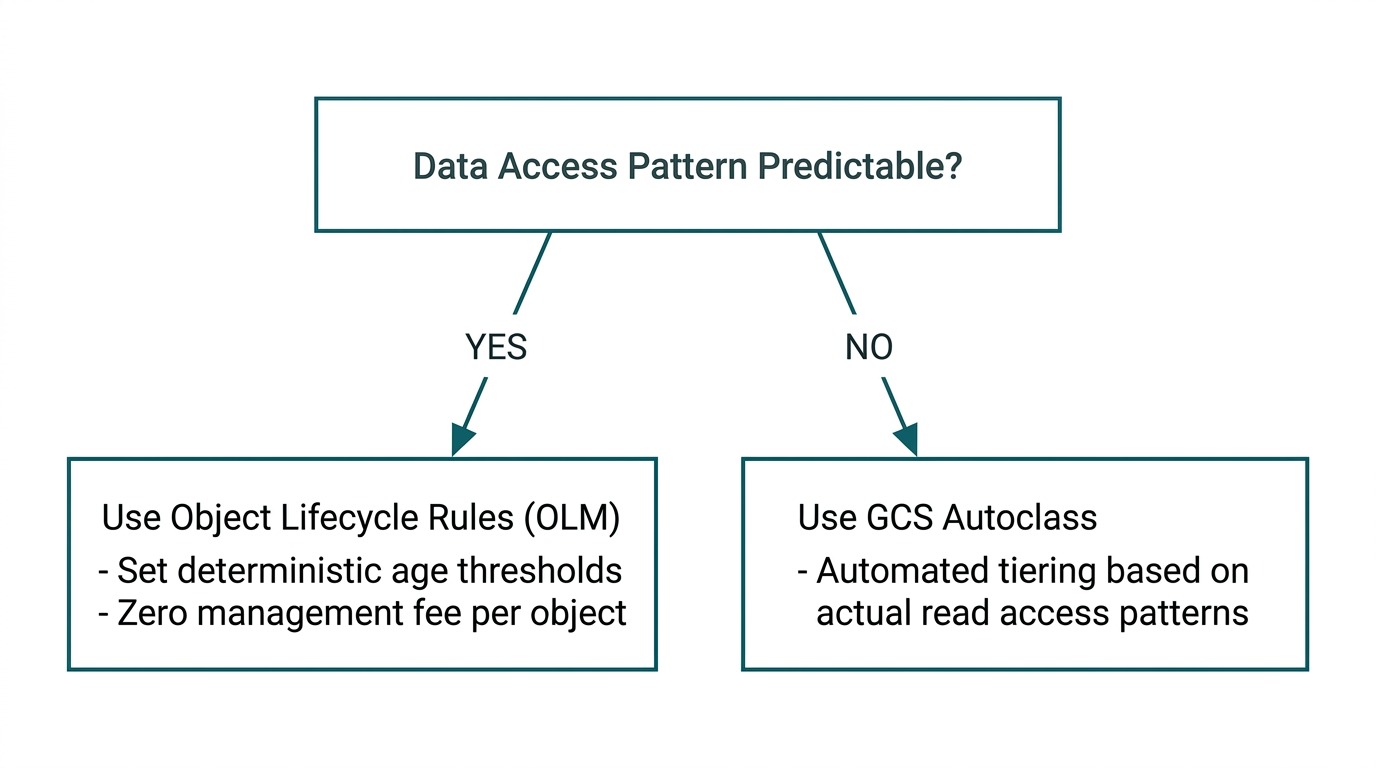
OLM applies set rules based on age, creation date, live state, or version history.
The following JSON policy automates a multi-stage decay model:
JSON
{
  "lifecycle": {
    "rule": [
      {
        "action": { "type": "SetStorageClass", "storageClass": "NEARLINE" },
        "condition": {
          "age": 30,
          "matchesStorageClass": ["STANDARD"],
          "isLive": true
        }
      },
      {
        "action": { "type": "SetStorageClass", "storageClass": "COLDLINE" },
        "condition": {
          "age": 90,
          "matchesStorageClass": ["NEARLINE"],
          "isLive": true
        }
      },
      {
        "action": { "type": "SetStorageClass", "storageClass": "ARCHIVE" },
        "condition": {
          "age": 365,
          "matchesStorageClass": ["COLDLINE"],
          "isLive": true
        }
      },
      {
        "action": { "type": "Delete" },
        "condition": {
          "daysSinceNoncurrentTime": 14,
          "isLive": false
        }
      },
      {
        "action": { "type": "AbortIncompleteMultipartUpload" },
        "condition": {
          "age": 3
        }
      }
    ]
  }
}
Apply this policy via gcloud:
Bash
gcloud storage buckets update gs://your-target-bucket --lifecycle-file=gcs_lifecycle_policy.json
When access patterns are completely unpredictable (e.g., user-generated content archives, machine learning feature stores with variable access frequency), manual OLM rules risk triggering heavy retrieval fees if archived data is accessed unexpectedly.
Bash
gcloud storage buckets update gs://unpredictable-data-bucket \
  --enable-autoclass \
  --autoclass-terminal-storage-class=ARCHIVE
Static alerts sent at the end of a billing cycle are too late to prevent budget overruns. Infrastructure managers need programmatic notification channels to catch unexpected ingest spikes immediately.
GCP Cloud Billing Budget Threshold ---> Pub/Sub Topic (budget-alerts) ---> Cloud Function/Cloud Run Handler ---> Action: Alert Team or Restrict Ingestion
Create a dedicated Google Cloud Pub/Sub topic to receive billing notifications.
Bash
gcloud pubsub topics create gcs-cost-alerts-topic
In the Cloud Billing console or via Terraform, configure a budget threshold (50%, 80%, 100%, 120%) linked to the Pub/Sub topic.
Terraform
resource "google_billing_budget" "gcs_budget" {
  billing_account = var.billing_account_id
  display_name    = "GCS Storage Cost Guardrail"

  budget_filter {
    services = ["services/95A0-3A0A-B507"] # Cloud Storage Service ID
  }

  amount {
    specified_amount {
      currency_code = "USD"
      units         = "5000"
    }
  }

  threshold_rules {
    threshold_percent = 0.8
  }
  threshold_rules {
    threshold_percent = 1.0
    spend_basis       = "FORECASTED_SPEND"
  }

  all_updates_rule {
    pubsub_topic = google_pubsub_topic.gcs_cost_alerts_topic.id
  }
}
Deploy a Cloud Function subscribed to the Pub/Sub topic. When a threshold of 100% or forecasted overrun occurs, the function logs detailed telemetry, alerts Slack/PagerDuty, and can optionally strip write permissions from unauthorized service accounts.
Python
import base64
import json
import os
import requests

def gcs_budget_alert_handler(event, context):
    """Parses Cloud Billing Pub/Sub messages and dispatches alerts."""
    if 'data' not in event:
        return

    pubsub_message = base64.b64decode(event['data']).decode('utf-8')
    data = json.loads(pubsub_message)

    cost = data.get('costAmount', 0)
    budget = data.get('budgetAmount', 0)
    threshold = data.get('alertThresholdExceeded', 0)

    webhook_url = os.environ.get('SLACK_WEBHOOK_URL')

    message = (
        f"🚨 *GCS Cost Threshold Triggered!*\n"
        f"*Current Spend:* ${cost:.2f} USD\n"
        f"*Budget Limit:* ${budget:.2f} USD\n"
        f"*Exceeded Threshold:* {threshold * 100}%"
    )

    if webhook_url:
        requests.post(webhook_url, json={"text": message})
        print("Alert successfully sent to Slack.")
To implement this playbook systematically across your engineering organization, execute the following phased checklist:
Managing cloud storage optimization across dozens of projects and hundreds of buckets can quickly burden infrastructure teams. While standard GCP tools provide the raw primitives, maintaining consistent governance across fast-growing environments requires dedicated expertise and structured oversight.
Cloudasta helps organizations transform unmanaged GCP environments into optimized, well-governed cloud platforms. Through automated governance frameworks, custom cost-attribution pipelines, and ongoing GCP FinOps management, Cloudasta enables IT leadership to:
* Automate enterprise-wide GCS lifecycle rules and Autoclass deployment.
* Enforce IAM and organizational constraints without slowing down software development.
* Gain real-time visibility into storage spend with customized BigQuery chargeback dashboards.
Partnering with Cloudasta allows engineering teams to focus on building products while ensuring cloud storage infrastructure remains lean, secure, and cost-effective by default.


