

Quick Summary (TL;DR): Firebase Crashlytics, Google’s real-time mobile crash reporting service, is a 100% free tool with no event limits, monthly active user (MAU) caps, or seat licenses. However, while Crashlytics itself has no base tier fee, engineering teams that export raw crash telemetry to Google Cloud BigQuery for advanced churn analysis incur standard Google Cloud (formerly Google Cloud Platform / GCP) usage costs. These costs consist primarily of BigQuery data streaming ingestion (~$0.05/GB), active logical storage ($0.020/GB/month), and SQL query execution ($6.25 per TiB scanned under on-demand pricing). Combining Firebase Crashlytics with BigQuery enables proactive debugging, joining real-time stack traces with customer lifetime value (LTV) and behavioral analytics to resolve the exact regressions that trigger app uninstalls.
Mobile users rarely submit bug reports; they simply abandon ship. Industry benchmarks consistently demonstrate that:
Traditional, reactive crash management relies solely on aggregated crash counts inside standalone dashboard UIs. However, prioritizing bugs by raw crash volume frequently misleads engineering leaders. A non-blocking exception that hits 10,000 anonymous visitors on an onboarding splash screen is often far less damaging to business viability than a fatal crash affecting 50 enterprise subscribers attempting to complete a high-ticket checkout. By pairing Firebase Crashlytics with Google Cloud BigQuery, engineering and product organizations transition from reactive firefighting to proactive, revenue-weighted triage.
One of the most frequent questions among mobile engineering leads and FinOps teams revolves around Crashlytics' cost and whether enterprise scale triggers surprise fees. Below is the definitive breakdown of how Firebase Crashlytics pricing operates alongside Google Cloud.
No. Firebase Crashlytics is provided free of charge on both the Firebase Spark Plan (no-cost tier) and the Firebase Blaze Plan (pay-as-you-go tier). There are no monthly active user (MAU) thresholds, retention paywalls for standard 90-day console reporting, or enterprise seat licenses.
The only direct cloud expense associated with Crashlytics arises when upgrading your project to the Firebase Blaze Plan to enable the native BigQuery Export Integration. Because Crashlytics streams granular, event-level telemetry (device states, OS versions, custom keys, breadcrumbs, and full stack traces) directly into your underlying Google Cloud project, you pay standard BigQuery data warehouse rates.
For mid-sized mobile operations handling 500,000 to 2,000,000 monthly sessions, total BigQuery costs for Crashlytics data typically range from $5 to $40 per month, a negligible footprint compared to third-party observability platforms that charge thousands of dollars per month in seat licenses and reserved event quotas.
While the native Firebase Console is excellent for identifying macro stability trends, it isolates crash telemetry from broader enterprise business intelligence. Streaming Crashlytics logs into BigQuery transforms operational exhaust into predictive retention data.
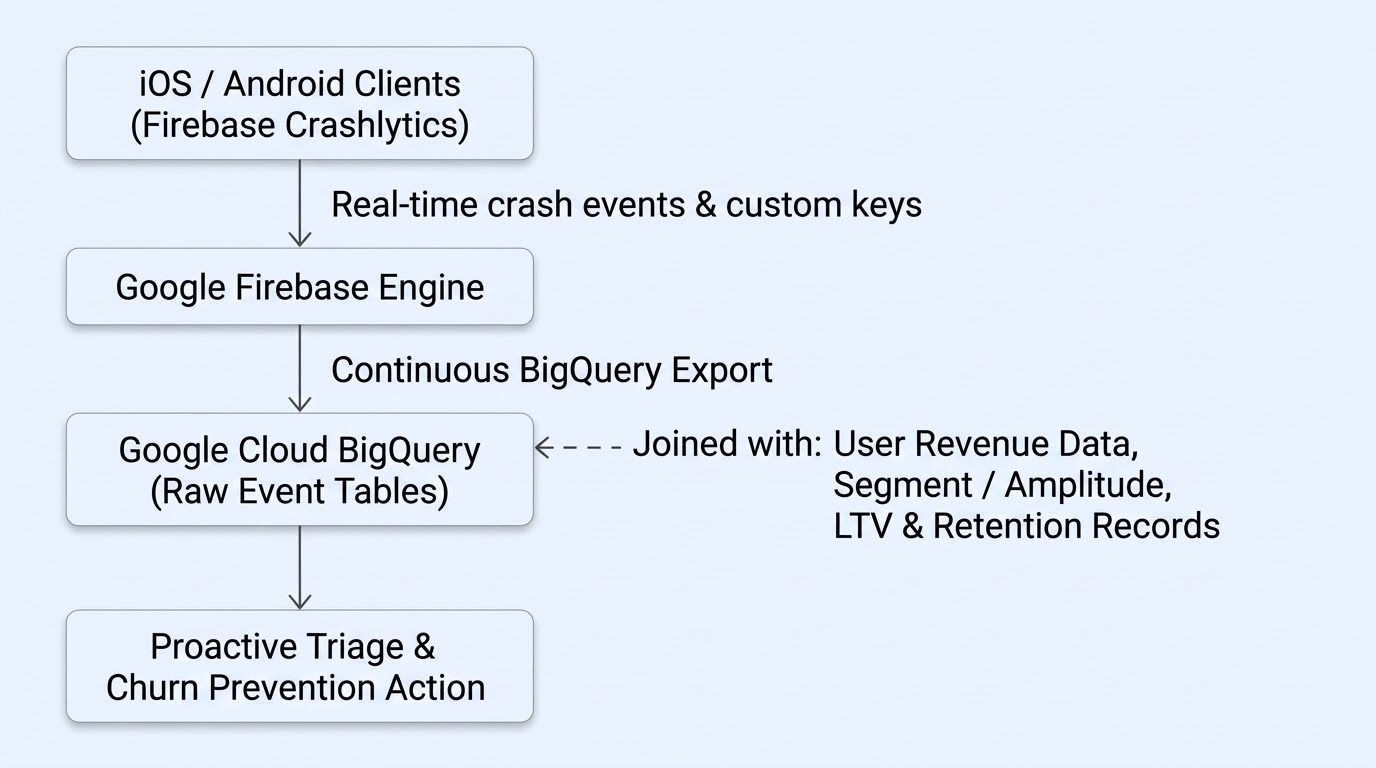
When raw Crashlytics records land in BigQuery (firebase_crashlytics.<package_name>_<PLATFORM>), data and mobile engineering teams can join them directly against production datasets:
To catch regressions that drive uninstalls before frustrated users migrate to competitors, run targeted SQL queries that join fatal exceptions with customer revenue profiles.
SQL
SELECT
  crash_events.issue_id,
  crash_events.issue_title,
  crash_events.issue_subtitle,
  COUNT(DISTINCT crash_events.user.id) AS affected_paying_users,
  ROUND(SUM(user_data.lifetime_value_usd), 2) AS total_revenue_at_risk
FROM
  `your-project.firebase_crashlytics.package_name_IOS` AS crash_events
JOIN
  `your-project.analytics.user_profiles` AS user_data
ON
  crash_events.user.id = user_data.user_id
WHERE
  crash_events.event_timestamp >= TIMESTAMP_SUB(CURRENT_TIMESTAMP(), INTERVAL 7 DAY)
  AND crash_events.is_fatal = TRUE
  AND user_data.is_paying_subscriber = TRUE
GROUP BY
  crash_events.issue_id,
  crash_events.issue_title,
  crash_events.issue_subtitle
ORDER BY
  total_revenue_at_risk DESC
LIMIT 10;
SQL
SELECT
  application.display_version AS app_version,
  issue_id,
  issue_title,
  COUNT(DISTINCT installation_uuid) AS affected_devices,
  COUNT(event_id) AS total_crashes
FROM
  `your-project.firebase_crashlytics.package_name_ANDROID`
WHERE
  event_timestamp >= TIMESTAMP_SUB(CURRENT_TIMESTAMP(), INTERVAL 24 HOUR)
  AND is_fatal = TRUE
GROUP BY
  app_version,
  issue_id,
  issue_title
HAVING
  total_crashes > 50
ORDER BY
  affected_devices DESC;
To keep your overall Crashlytics-to-BigQuery cost low while maintaining deep observability, enforce these three engineering guardrails:
Firebase automatically partitions exported Crashlytics tables in BigQuery by day using the event_timestamp column (and clusters them by event_timestamp, is_fatal, and issue_id). Always include a WHERE event_timestamp >= ... filter in your SQL queries, or _PARTITIONDATE if querying legacy ingestion-time partitioned tables. Partition pruning prevents full-table scans and drastically reduces scanned bytes under Google Cloud's $6.25/TiB on-demand pricing.
While Crashlytics allows up to 64 custom key-value pairs (each up to 1 KB), logging massive string payloads or high-cardinality metadata bloats streaming ingestion and storage overhead. Restrict custom keys to concise, high-signal diagnostic attributes:
Raw stack traces older than 180 days rarely require real-time SQL querying. Configure partition expiration policies on your BigQuery dataset (for example, default_partition_expiration_days = 180) or export historical data to Google Cloud Storage Coldline or Archive buckets, cutting long-term storage costs down to fractions of a cent per gigabyte.
While toggling on the BigQuery export in the Firebase Console takes only a few clicks, operationalizing proactive crash analytics across an enterprise environment introduces governance, security, and FinOps hurdles:
As a Premier Google Cloud Partner, Cloudasta helps engineering, product, and FinOps teams obtain a cost-optimized retention engine.
Ready to turn your mobile crash data into a cost-efficient engine for user retention? Contact Cloudasta today to schedule a consultation with our Google Cloud experts.
Yes. Google provides Firebase Crashlytics 100% free of charge on both the Spark and Blaze plans, with no limits on daily crash volume, application installs, or developer seats.
Unlike third-party observability tools such as Sentry, Datadog, or Bugsnag, which charge tiered monthly subscriptions based on reserved event quotas and seat licenses, Firebase Crashlytics has no recurring base fee. You only pay standard Google Cloud infrastructure rates if you choose to stream raw crash events into BigQuery.
Yes. Firebase Crashlytics automatically captures Application Not Responding (ANR) errors on Android and Out-of-Memory (OOM) terminations alongside fatal crashes and non-fatal exceptions, streaming full stack frames to both the Firebase Console and your linked BigQuery dataset.
Proactive debugging pairs real-time crash telemetry with business and behavioral context. Instead of waiting for frustrated users to leave 1-star reviews or uninstall the app, product and engineering teams can run automated BigQuery queries to identify which regressions impact high-value subscriber segments, deploy targeted hotfixes, and trigger proactive customer support outreach.


