Demystifying Compute Engine Cost: How to Right-Size VMs and Slash Your GCP Bill
The Cloud Overspending Dilemma
For many organizations, migrating to Google Cloud Platform (GCP) promises agility, scalability, and performance. However, when the monthly bill arrives, IT leaders and FinOps teams are often met with unexpected sticker shock.
At the center of most GCP invoices is Compute Engine cost. Because virtual machines (VMs) are the backbone of cloud infrastructure, improper VM sizing, misconfigured disk storage, and underutilized commitments can quickly turn cloud flexibility into an operational expense nightmare.
The good news? Google Cloud offers some of the most granular, flexible pricing options in the cloud industry. By understanding how Compute Engine calculates charges and learning how to "right-size" your virtual machines, you can significantly reduce your GCP bill without sacrificing performance.
In this comprehensive guide, we will break down the mechanics of Compute Engine pricing, map out GCP’s VM machine families, and provide actionable tips to right-size your infrastructure—along with how partnering with Cloudasta can accelerate your cloud cost optimization.
1. Deconstructing the Compute Engine Pricing Model
To optimize your Compute Engine cost, you first need to understand how Google Cloud calculates what you owe. Unlike traditional hosts that charge a rigid flat fee for a bundled "server package," GCP uses a resource-based pricing model.
A. Granular vCPU and Memory Billing
Every virtual machine you launch is billed separately for its core building blocks:
vCPUs (Virtual CPUs): Charged per vCPU hour/second.
RAM (Memory): Charged per Gigabyte (GB or GiB) hour/second.
The 1-Minute Minimum Rule:
All vCPUs, GPUs, and memory resources have a minimum billing duration of 1 minute. If a VM runs for 30 seconds, you are billed for 1 minute. After the first minute, usage is calculated in exact 1-second increments.
B. The Hidden Drivers of Your Compute Engine Bill
Your compute bill consists of more than just CPU and RAM. To calculate the true cost of running a VM, you must account for four associated components:
Block Storage (Disks): VMs require storage. Whether you choose Standard Persistent Disk (PD), Balanced PD, SSD PD, Extreme PD, or Hyperdisk, you pay for the provisioned capacity (in GB/month) regardless of whether the VM is running or stopped.
Network Egress: While inbound data transfer (ingress) to GCP is free, sending data out of your VM to the internet, another cloud, or a different GCP region incurs network egress charges. GCP offers two network tiers:
Premium Tier: Uses Google’s high-performance global backbone network.
Standard Tier: Routes traffic via the public internet at a lower cost.
Operating System Licenses: Running free open-source Linux (Debian, Ubuntu) incurs no OS charge. However, premium operating systems incur additional hourly fees:
Windows Server: Charged per visible vCPU per hour.
Red Hat Enterprise Linux (RHEL): Billed per core-hour, in tiers based on vCPU count. SUSE (SLES): Billed at a flat hourly rate per VM, regardless of core count.
IP Addresses: Static and ephemeral external IP addresses attached to running VMs carry nominal hourly fees, but unused static external IPs carry a higher penalty fee to encourage clean-up.
2. Navigating GCP Machine Families: Matching Workloads to Hardware
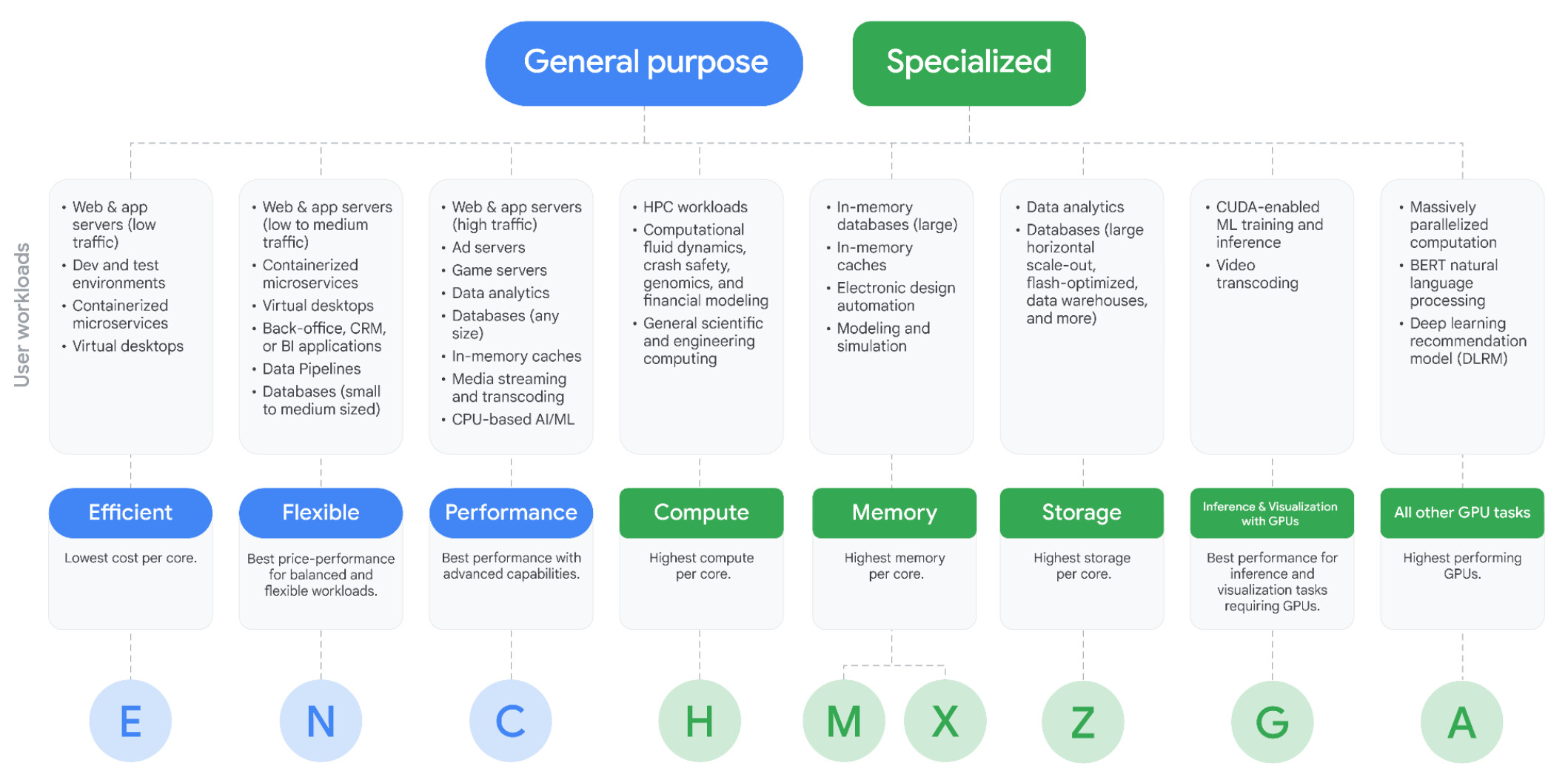
Google Cloud categorizes its virtual machines into General Purpose and Specialized machine families. Choosing the wrong family is one of the most common causes of inflated Compute Engine costs.
General-Purpose Families (Balanced & Versatile)
Efficient (E Series - e.g., E2): Offers the lowest cost per core. Best for low-traffic web/app servers, dev/test environments, and lightweight microservices.
Flexible (N Series - e.g., N1, N2, N2D, N4, N4A): The workhorse of GCP. Offers balanced vCPU-to-memory ratios and support for Custom Machine Types. Ideal for medium-traffic web apps, databases, and data pipelines. (Note: N4A and C4A leverage Google Axion ARM processors for superior price-performance).
Performance (C Series - e.g., C2, C3, C4, C4D, C4N): Built for high-performance computing, high-traffic ad servers, gaming servers, and intensive database workloads requiring maximum compute power per core and advanced network offloads (via Google Titanium).
Specialized Families (Maximum Performance)
Compute-Optimized (H Series - e.g., H3, H4D): Delivers the highest compute performance per core. Tailored for HPC workloads like computational fluid dynamics (CFD), genomics, and financial modeling.
Memory-Optimized (M & X Series - e.g., M1, M2, M3, M4, X4): Offers massive RAM capacity (up to multi-terabytes). Designed for large in-memory databases like SAP HANA and electronic design automation (EDA).
Storage-Optimized (Z Series - e.g., Z3): Provides high storage density with attached NVMe Local SSDs. Ideal for scale-out analytics, flash-optimized databases, and data warehousing.
Accelerator / GPU Families (G & A Series - e.g., G2, G4, A2, A3, A4): Equipped with NVIDIA GPUs (such as RTX PRO 6000, H100, H200, B200) or Google Cloud TPUs (Trillium, Ironwood) for CUDA-enabled ML training, LLM inference, video transcoding, and 3D rendering.
3. The Discount Arsenal: How to Pay Less for the Same Compute
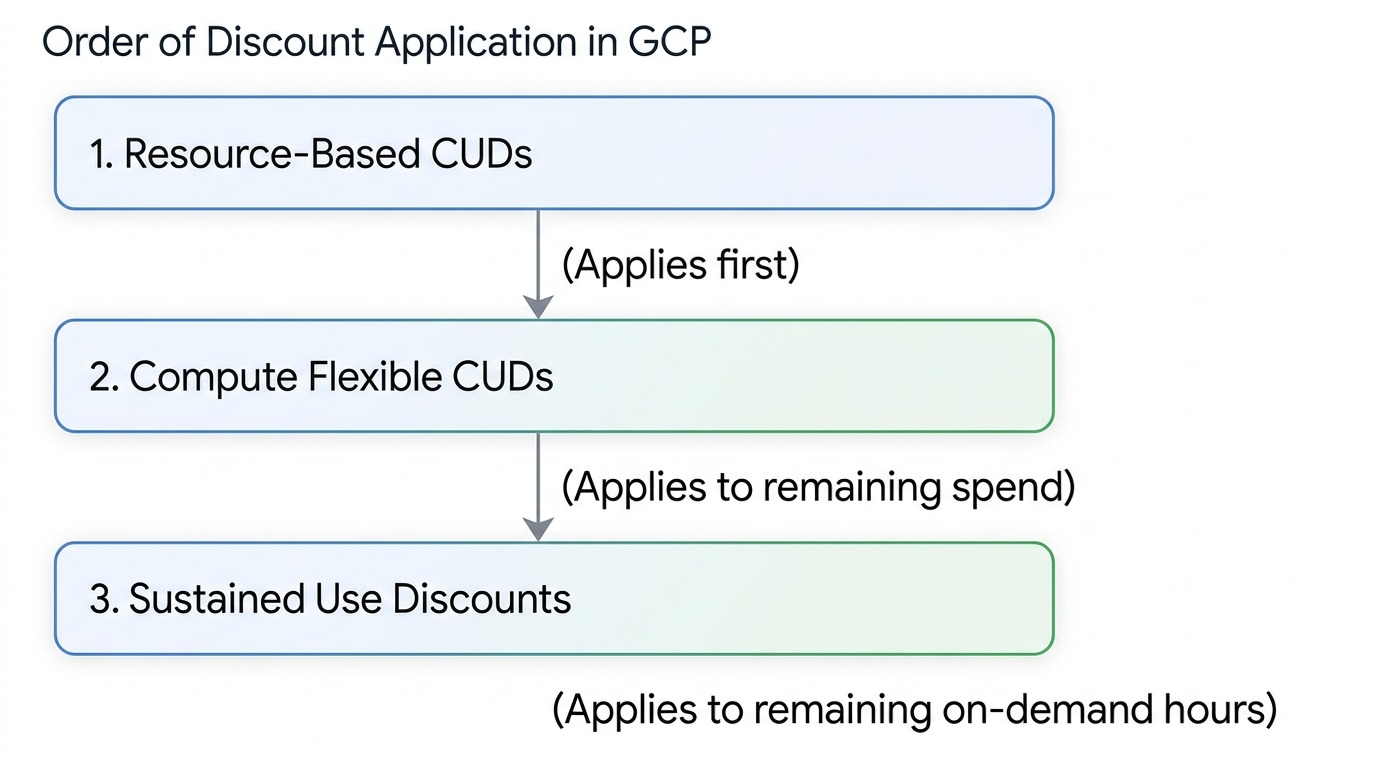
Google Cloud provides several built-in discount mechanisms. Understanding how they interact is essential to controlling your Compute Engine cost.
1. Spot VMs (Save up to 91%)
Spot VMs leverage unused GCP compute capacity. They offer identical performance to standard VMs at a massive discount (up to 91%). The catch? Google can preempt (terminate) them with a 30-second warning if capacity is needed elsewhere.
Best for: Batch processing, fault-tolerant stateless workloads, containerized microservices, and CI/CD pipelines.
2. Committed Use Discounts (CUDs)
When you commit to a minimum level of usage or hourly spend for a 1-year or 3-year term, GCP provides deep discounts:
Resource-Based CUDs: You commit to a specific amount of vCPU, RAM, GPU, or Local SSD in a specific region and machine series. Saves up to 55% (general purpose) or 70% (memory-optimized).
Compute Flexible CUDs: You commit to a minimum hourly dollar spend across Compute Engine, GKE, and Cloud Run, regardless of region or machine series. Saves 28% (1-Year) or 46% (3-Year).
3. Sustained Use Discounts (SUDs)
SUDs are automatic discounts applied to N1, N2, and select legacy predefined VM types that run for more than 25% of a billing month without other commitments. You can receive up to a 30% net discount automatically simply for keeping a VM running continuously.
4. Practical Right-Sizing Strategies to Slash Your Bill
Now that you understand the pricing mechanics, let’s explore practical, hands-on strategies to eliminate waste.
Standard predefined VM shapes follow fixed ratios (e.g., standard 1:4 vCPU-to-RAM ratio).
The Problem: If your application requires 16 vCPUs to process peak requests, but only uses 20 GB of RAM, picking a standard c4-standard-16 (16 vCPU, 60 GB RAM) forces you to pay for 40 GB of RAM you will never use.
The Solution: Use Custom Machine Types (available on E2, N1, N2, N4, etc.). You can configure exact specs—like 16 vCPUs and 20 GB RAM. On-demand custom shapes carry no price premium over predefined types (a 5% premium only applies if you cover the instance with a resource-based Committed Use Discount), so eliminating unused RAM often slashes that specific instance's cost by 30% to 40%.
Strategy 2: Act on GCP Recommender Insights
Google Cloud built-in AI analyzes real-time CPU, memory, and disk utilization over a 8-day rolling window.
Navigate to the Compute Engine > Recommender tab in your GCP Console.
Review Right-sizing Recommendations.
Identify idle or severely underutilized VMs and execute instance resizing or shutdown workflows.
Strategy 3: Clean Up "Orphaned" Resources
Stopping a VM stops the vCPU and RAM charges, but the associated resources continue to bill every hour:
Unattached Persistent Disks: Disks left behind when VMs are deleted.
Old Disk Snapshots: Outdated snapshots stored in regional/multi-regional storage.
Unused Static Public IPs: Reserved IP addresses that are not attached to an active VM or load balancer.
Establishing automated scripts or lifecycle policies to purge orphaned disks and snapshots can yield immediate savings.
Strategy 4: Adopt Modern Processor Architectures
Upgrading from legacy VM series to newer generations often yields better performance at a lower price point:
Migrating from N1 to N2/N2D provides better performance per core at lower cost.
Migrating workloads compatible with ARM architecture to N4A or C4A (Google Axion) can offer up to 2x better price-performance compared to previous-generation x86 instances.
Right-size Storage: Do not use Extreme PD or Local SSD for static file storage or boot disks. Standard PD or Balanced PD is usually more than sufficient.
Network Tiers: If your application isn't latency-critical or serves localized traffic, switching egress traffic from Premium Tier to Standard Tier can lower egress bandwidth costs significantly.
5. Partnering with Cloudasta: Your GCP Cost Optimization Ally
Managing Compute Engine costs isn't a one-time project—it’s a continuous governance disciplined known as FinOps. As your applications evolve, keeping track of machine shapes, CUD expiration dates, and architectural efficiency can strain your internal engineering team.
This is where Cloudasta steps in as your dedicated Google Cloud Support Partner.
How Cloudasta Helps You Master Compute Engine Cost:
In-Depth Infrastructure Audits: We perform comprehensive health and cost assessments of your GCP environment, pinpointing idle resources, over-provisioned VMs, and storage inefficiencies.
Custom CUD & Commitment Modeling: We help you structure a blended commitment strategy—combining Resource-Based CUDs and Flexible CUDs—to maximize discount coverage without lock-in risk.
Hands-on Right-Sizing Execution: We don't just give you a report; our certified GCP engineers work alongside your team to safely resize instances, adjust storage policies, and modernize machine families.
Ongoing FinOps Support & Monitoring: Cloudasta provides continuous monitoring, alerting, and proactive advisory services so your GCP bill stays lean as your business scales.
Conclusion
Controlling your Compute Engine cost does not require sacrificing system performance or reliability. By understanding how GCP bills for resources, choosing the right machine family, taking advantage of custom shapes, and leveraging commitment discounts, you can dramatically optimize your cloud spend.
Ready to unlock maximum value from your Google Cloud investment? Contact Cloudasta today for a tailored GCP cost optimization assessment and let our experts help you build a leaner, faster, and more cost-effective cloud infrastructure.
Cloudasta, Google Workspace Productivity & Migration Experts
Your one-stop partner for seamless migrations, expert advisory, support, and training.